Recuperação após desastres
Definição de um desastre
Este capítulo descreve como se recuperar após um desastre. Antes de continuarmos, temos que primeiramente definir o que um desastre realmente é. Duas categorias podem ser diferenciadas:
- Perda ou corrupção de arquivos de origem ou o sistema de origem como um todo (como a perda da máquina por exemplo).
- Arquivos de backup faltando ou corruptos.
Como recuperar arquivos para a localização original do mesmo sistema e como recuperar arquivos de um backup consistente para um novo backup são descritos em Restaurando arquivos de um backup e Restaurando arquivos se sua instalação do Módulo Agente foi perdida.
Este capítulo descreve o processo de restaurar o tanto quanto for possível de um backup que está inconsistente devido a arquivos corruptos ou desaparecidos no sistema remoto, sem acesso aos arquivos de origem e a instalação do Módulo Agente.
Normalmente você pode instalar a aplicação em qualquer computador, cadastrá-la novamente e então na seção "Restaurar do e-notariado" é possível recuperar os arquivos e a aplicação irá tentar resolver quaisquer problemas que encontrar. Porém se há um dano significativo nos arquivos de backup localizados remotamente, a restauração pode falhar, resultando na abortação da operação de restauraão e deixando arquivos potencialmente restauráveis sem serem recuperados. Nesta situação você pode usar a ferramenta de recuperação Duplicati.CommandLine.RecoveryTool.exe para recuperar arquivos que não foram afetados pela corrupção sofrida no backup. Você pode usar esta ferramenta para realizar manualmente as operações normalmente feitas automaticamente.
Cenário de testes
Para explicar como a ferramenta de recuperação funciona, a seguinte configuração é assumida:
O computador que continha os arquivos de origem possuía 4 versões de um backup da pasta "Minhas Imagens". Este computador, incluindo sua instalação da aplicação e suas imagens, foi perdido.
O backup, feito usando o sistema do e-notariado, possuía um tamanho de carregamento diminuído de 50MB (o padrão) para 10MB, resultando em arquivos menores porém em maior quantidade, o que faz sentido para este exemplo. Depois de 4 execuções do backup, os arquivos no sistema do e-notariado estão organizados da seguinte maneira:
10,453,901  duplicati-b69a2a32a50bb4c6d8780389efdbf7442.dblock.zip.aes
     8,173  duplicati-i84de11dd9a334727a080a3cdedc11f76.dindex.zip.aes
10,409,309  duplicati-bb1e603b91cae420787ed855d40e7cc04.dblock.zip.aes
     9,677  duplicati-i77fdd0fa598d49fa93c5fedf3dbf4003.dindex.zip.aes
10,408,733  duplicati-b8fd38dcd303c4bcdb65dc15611f9b13b.dblock.zip.aes
     8,317  duplicati-id6042b5ed9c34faa86e41fd3bcff72d2.dindex.zip.aes
10,465,421  duplicati-bb1c167fdb8ef46e6a83fe1d5b8b33cbf.dblock.zip.aes
     6,765  duplicati-i1070213c1cea4844b3ace60c305854de.dindex.zip.aes
10,484,045  duplicati-b2b4fb88d1edd4eccade6b0ea6fdbfcf3.dblock.zip.aes
    11,341  duplicati-i0c85219ca5764fb183b4306e65ed2034.dindex.zip.aes
10,472,541  duplicati-bc70688944c1b4875b7561e8046dd582d.dblock.zip.aes
     8,301  duplicati-i726df1085487421b98bf9786e40d045f.dindex.zip.aes
10,384,701  duplicati-bf43697c750e746aead28ceb71af19359.dblock.zip.aes
     9,101  duplicati-ie084e3c9380847a8a01acefcb8245fe3.dindex.zip.aes
10,392,317  duplicati-bf797fdce00794d0dbeb31de1f3867240.dblock.zip.aes
     7,501  duplicati-i91b0156c9ced43bda26b6cef88f969b3.dindex.zip.aes
 1,754,637  duplicati-b13a41763d40e4001911fd6f5d5d6c53d.dblock.zip.aes
     3,709  duplicati-id79f5ccc6cb54f5faa7bbcf72c8e7428.dindex.zip.aes
     5,133  duplicati-20171109T100606Z.dlist.zip.aes
10,415,597  duplicati-bb4cb32561132426eba2e190089585362.dblock.zip.aes
     8,125  duplicati-ifd7c3d7bed47403197515b40821075fc.dindex.zip.aes
10,433,469  duplicati-b385c55aa15bd403e9fcb5a321339e76a.dblock.zip.aes
     6,909  duplicati-i59e5c4064b3d422995200772bd267645.dindex.zip.aes
10,447,373  duplicati-b4e0bcd6b8c0b4d648a97e53c32550cce.dblock.zip.aes
     8,829  duplicati-i21d3fcafc53b42bfa0dfe4cfdcc6a0d9.dindex.zip.aes
10,425,485  duplicati-b34811487cc1843e289ac577b6a7a8533.dblock.zip.aes
     8,093  duplicati-i92dcf425b2d14c8780c2938f84e2bc2c.dindex.zip.aes
 8,052,173  duplicati-bc385594379874159b0863dca12818ac7.dblock.zip.aes
     8,621  duplicati-ib02c8a76143440b99ec94773a7b00c90.dindex.zip.aes
     6,829  duplicati-20171109T100653Z.dlist.zip.aes
10,397,085  duplicati-b836b265755ff41ae908ef64e551ec63b.dblock.zip.aes
     8,717  duplicati-i0903704f50ec4277a0cb6e224bde49cb.dindex.zip.aes
10,404,509  duplicati-bc230fc2ccec54a33b2035fcbc0231ce4.dblock.zip.aes
     7,741  duplicati-i53b454d535de49e1983364b97bd681a1.dindex.zip.aes
10,463,597  duplicati-b54b864868bf341bcb88bff9ad786b8a3.dblock.zip.aes
     4,365  duplicati-id1e3d59e5e3e48f59a6fbd7f46b4bb8c.dindex.zip.aes
10,413,933  duplicati-b2b06934c5d764025a6965f1749d86a90.dblock.zip.aes
    11,421  duplicati-ifd2b08eaf75b43748739c5a140cb1267.dindex.zip.aes
10,468,957  duplicati-b5f8cd40e22a54b5b988689370b8cde34.dblock.zip.aes
     6,749  duplicati-ib9a135574fa84222beea313ac583463b.dindex.zip.aes
10,383,805  duplicati-bfa5ecd54953f455496a67b089e2ad35b.dblock.zip.aes
    10,301  duplicati-i19aa26f9c15e432ea5114c93acd52661.dindex.zip.aes
 4,505,165  duplicati-bd14cf57e975040808ac8d0f4bd9d5e36.dblock.zip.aes
     4,797  duplicati-id08a17cbe0a04407b4be37d2c48e8ab9.dindex.zip.aes
     8,749  duplicati-20171109T100737Z.dlist.zip.aes
10,483,357  duplicati-be6e935d55f0b443b8c716c83aebccb93.dblock.zip.aes
     9,885  duplicati-ic209185103c045bb87a680e98b78269b.dindex.zip.aes
   974,909  duplicati-b7fa18a6f863a42fea5f210cc5f1416e5.dblock.zip.aes
     2,125  duplicati-i57ce5109be6c4441998fc2bfb2cd0f3a.dindex.zip.aes
     9,901  duplicati-20171109T100815Z.dlist.zip.aes
Existe um arquivo .dlist para cada versão do backup. Os dados são armazenados em vários arquivos .dblock. Cada arquivo .dblock possui um arquivo .dindex que o acompanha. Este é um backup consistente, porém para este cenário de testes, alguns arquivos foram intencionalmente corrompidos colocando dados aleatórios neles e também removemos um arquivo .dblock.
Inventário de arquivos que serão corrrompidos
Antes de corromper o backup consistente, nos podemos realizar o inventário de quais serão as consequências se estes arquivos forem perdidos. É possível usar o comando affected para ver quais arquivos são afetados por um arquivo remoto. O comando affected precisa da base de dados local, então só é possível realizar esta operaçãos se você possuir uma instalação completamente funcional desta aplicação com este backup configurado. Veja O comando AFFECTED para mais informações.
O primeiro comando retorna quais arquivos de origem precisam de informações do arquivo remoto chamado duplicati-b69a2a32a50bb4c6d8780389efdbf7442.dblock.zip.aes.
Duplicati.CommandLine.exe affected "ftp://myftpserver.com/Backup/Pictures?auth-username=Duplicati&auth-password=backup" duplicati-b69a2a32a50bb4c6d8780389efdbf7442.dblock.zip.aes --dbpath="C:\Users\User\DuplicatiCanary\data\WCHNJBICGG.sqlite" --full-result
Este comando irá retornar que todas as 4 versões de backup precisam de dados dentro deste arquivo. Os seguintes arquivos são afetados:
C:\Users\User\Pictures\file0001079221497.jpg
C:\Users\User\Pictures\file0001116000079.jpg
C:\Users\User\Pictures\file0001141038889.jpg
C:\Users\User\Pictures\file0001176452626.jpg
O segundo comando retorna as versões de backup e os arquivos de origem relacionados ao arquivo remoto duplicati-b5f8cd40e22a54b5b988689370b8cde34.dblock.zip.aes:
Duplicati.CommandLine.exe affected "ftp://myftpserver.com/Backup/Pictures?auth-username=Duplicati&auth-password=backup" duplicati-b5f8cd40e22a54b5b988689370b8cde34.dblock.zip.aes --dbpath="C:\Users\User\DuplicatiCanary\data\WCHNJBICGG.sqlite" --full-result</span></span>
Apenas os últimos dois backups são afetados (versões 0 e 1). Estes dois arquivos não são possíveis de serem restaurados se este arquivo remoto for perdido ou corrompido:
C:\Users\User\Pictures\file451264266022.jpg
C:\Users\User\Pictures\file621250696198.jpg
Conclusão: Se os 2 arquivos remotos mencionados acima não estiverem disponíveis, as 6 imagens podem ser consideradas perdidas, mas com a ferramenta de recuperação todos os outros arquivos no backup podem ser restaurados.
Making the backup inconsistent
This is, of course, something that never should be done in a production environment, but for this test scenario we will intentionally damage the backup set, making it unusable for standard backup- and restore operations.
The following actions are performed on the backend:
- File
duplicati-b69a2a32a50bb4c6d8780389efdbf7442.dblock.zip.aesis deleted. - File
duplicati-b5f8cd40e22a54b5b988689370b8cde34.dblock.zip.aesis replaced by a file with the same name containing random data.
Restoring files from this corrupted backup set will fail before the first file is actually restored. You can recover from this situation by using one of these procedures:
- Recovering by purging unrestorable files from the backups.
- Recovering by using the Duplicati Recovery Tool.
Prerequisites for recovery
To be able to restore files in these scenarios, you will need:
- The protocol, location and credentials of the remote location where your backup files are stored.
- The passphrase used to encrypt your backup (if any).
- A computer that you can use for restoring data with enough free storage capacity for all files you want to restore
- The Duplicati Command Line tools. These tools are part of a standard Duplicati setup.
- If you are using the Duplicati Recovery Tool: temporary local storage with enough free space to store all backup files.
Recovering by purging files
If you still have access to your computer running Duplicati and the backup job has a valid local database, Duplicati can analyze the files that should be in the backup and compare this what's actually at the remote location. Use the Duplicati command list-broken-files to list files that cannot be restored due to corruption or missing data. The command purge-broken-files actually deletes these files from all backup versions.
To get an impression of the damage to the backup set, run this command:
Duplicati.CommandLine.exe list-broken-files "ftp://myftpserver.com/Backup/Pictures?auth-username=Duplicati&auth-password=backup" --dbpath="C:\Users\User\DuplicatiCanary\data\WCHNJBICGG.sqlite" --passphrase="4u7P_re5&+Gb>6NO{" --full-result
The result is:
No broken filesets found in database, checking for missing remote files
  Listing remote folder ...
remote file duplicati-b5f8cd40e22a54b5b988689370b8cde34.dblock.zip.aes is listed as Verified with size 9569280 but should be 10468957, please verify the sha256 hash "hIPABrSE/6xN041ut6IKb0sUSMxYGRI3ZqAWwY+q6JM="
Marked 1 remote files for deletion
3       : 11/9/2017 11:06:06 AM (5 match(es))
        C:\Users\User\Pictures\file0001079221497.jpg (4.89 MB)
        C:\Users\User\Pictures\file0001116000079.jpg (302.49 KB)
        C:\Users\User\Pictures\file0001141038889.jpg (3.50 MB)
        C:\Users\User\Pictures\file0001176452626.jpg (1.65 MB)
2       : 11/9/2017 11:06:53 AM (4 match(es))
        C:\Users\User\Pictures\file0001079221497.jpg (4.89 MB)
        C:\Users\User\Pictures\file0001116000079.jpg (302.49 KB)
        C:\Users\User\Pictures\file0001141038889.jpg (3.50 MB)
        C:\Users\User\Pictures\file0001176452626.jpg (1.65 MB)
1       : 11/9/2017 11:07:37 AM (4 match(es))
        C:\Users\User\Pictures\file0001079221497.jpg (4.89 MB)
        C:\Users\User\Pictures\file0001116000079.jpg (302.49 KB)
        C:\Users\User\Pictures\file0001141038889.jpg (3.50 MB)
        C:\Users\User\Pictures\file0001176452626.jpg (1.65 MB)
0       : 11/9/2017 11:08:15 AM (4 match(es))
        C:\Users\User\Pictures\file0001079221497.jpg (4.89 MB)
        C:\Users\User\Pictures\file0001116000079.jpg (302.49 KB)
        C:\Users\User\Pictures\file0001141038889.jpg (3.50 MB)
        C:\Users\User\Pictures\file0001176452626.jpg (1.65 MB)
The 4 files from the deleted .dblock file are detected to be broken. Also detected is a change to the .dblock file that contains the other 2 files.
First we solve the problem with the deleted remote .dblock file by using the purge-broken-files command.
Add advanced option
--dry-runto the command below to see what the command will do, before actually purging the files from the backups.
Duplicati.CommandLine.exe purge-broken-files "ftp://myftpserver.com/Backup/Pictures?auth-username=Duplicati&auth-password=backup" --dbpath="C:\Users\User\DuplicatiCanary\data\WCHNJBICGG.sqlite" --passphrase="4u7P_re5&+Gb>6NO{" --full-result
The purge-broken-files command returns this information:
No broken filesets found in database, checking for missing remote files
  Listing remote folder ...
remote file duplicati-b5f8cd40e22a54b5b988689370b8cde34.dblock.zip.aes is listed as Verified with size 9569280 but should be 10468957, please verify the sha256 hash "hIPABrSE/6xN041ut6IKb0sUSMxYGRI3ZqAWwY+q6JM="
Marked 1 remote files for deletion
Found 4 broken filesets with 17 affected files, purging files
Purging 5 file(s) from fileset 11/9/2017 11:06:06 AM
Starting purge operation
Replacing fileset duplicati-20171109T100606Z.dlist.zip.aes with duplicati-20171109T100607Z.dlist.zip.aes which has with 5 fewer file(s) (10.33 MB reduction)
  Uploading file (4.47 KB) ...
  Deleting file duplicati-20171109T100606Z.dlist.zip.aes ...
Purging 4 file(s) from fileset 11/9/2017 11:06:53 AM
Starting purge operation
Replacing fileset duplicati-20171109T100653Z.dlist.zip.aes with duplicati-20171109T100654Z.dlist.zip.aes which has with 4 fewer file(s) (10.33 MB reduction)
  Uploading file (6.22 KB) ...
  Deleting file duplicati-20171109T100653Z.dlist.zip.aes ...
Purging 4 file(s) from fileset 11/9/2017 11:07:37 AM
Starting purge operation
Replacing fileset duplicati-20171109T100737Z.dlist.zip.aes with duplicati-20171109T100738Z.dlist.zip.aes which has with 4 fewer file(s) (10.33 MB reduction)
  Uploading file (8.09 KB) ...
  Deleting file duplicati-20171109T100737Z.dlist.zip.aes ...
Purging 4 file(s) from fileset 11/9/2017 11:08:15 AM
Starting purge operation
Replacing fileset duplicati-20171109T100815Z.dlist.zip.aes with duplicati-20171109T100816Z.dlist.zip.aes which has with 4 fewer file(s) (10.33 MB reduction)
  Uploading file (9.22 KB) ...
  Deleting file duplicati-20171109T100815Z.dlist.zip.aes ...
  Deleting file duplicati-b69a2a32a50bb4c6d8780389efdbf7442.dblock.zip.aes (9.97 MB) ...
Operation Delete with file duplicati-b69a2a32a50bb4c6d8780389efdbf7442.dblock.zip.aes attempt 1 of 5 failed with message: The remote server returned an error: (550) File unavailable (e.g., file not found, no access). => The remote server returned an error: (550) File unavailable (e.g., file not found, no access).
Some information from the messages above:
duplicati-b5f8cd40e22a54b5b988689370b8cde34.dblock.zip.aesis corrupted and marked for deletion.- Files that cannot be restored are deleted from all backup versions that contain these files (17 total). Note that this are not 17 unique source files, one file is usually included in multiple backup versions.
- New, consistent backup files are generated and uploaded to the backend.
Recovering by using the Duplicati Recovery tool
The Duplicati Recovery tool allows to perform actions manually that are normally done automatically when running backup or restore operations. A normal restore consists of the following operatrions:
- Duplicati determines which remote files are needed to restore the specified files.
- Duplicati downloads the first required remote file.
- The file is decrypted using the supplied passphrase.
- Duplicati uses the .DINDEX files to determine how files can be recreated by merging blocks inside .DBLOCK files in the correct order.
- The recreated files are moved to the supplied Restore location.
The Duplicati Recovery Tool can perform these actions step by step, giving you more control over each step in the restore process.
In disaster recovery scenarios, the Duplicati Recovery Tool performs 3 steps:
- All remote files are downloaded from the backend, decrypted and stored in the local filesystem.
- An index is built that allows Duplicati to keep track of what information is stored in which file.
- Files are restored from the downloaded backend files by recreating them using the blocks inside the .DBLOCK files.
Optionally, these additional actions can be performed:
- List files that are available in the downloaded remote files.
- Recompress and/or re-upload files to the backend. This is useful if you want to change the compression type of an existing backup job. Changing the compression type (.7z to .zip) is not supported, but you can do this by downloading the complete backup, decrypt all files, extract all files, recompress the files using another compression type, re-encrypt the files and re-upload them to the backend. Additionally edit the backup configuration to use the new compression type for future backups.
Downloading all remote files using the Recovery Tool
The first step is downloading all files that are used by the backup job. This step is required, because a lot of read/write operations have to be performed to the remote files. All files must be decrypted and the contents of all files must be read to analyze the contents.
Remote files can be downloaded using the download command:
Duplicati.RecoveryTool.exe download <remoteurl> <localfolder> [options]
This command fill download all remote files from <remoteurl>, decrypt the files and store the decrypted files in <localfolder>.
Required information:
- Storage type
In this example the backup is stored using FTP, but all storage types are supported. See Storage Providers for more information. - Address, path and credentials to access the remote files
In this example the address ismyftpserver.com, the path is/Backup/Pictures, the FTP username isduplicatiand the FTP password isbackup. - The passphrase used to encrypt the backup
In this example the passphrase4u7P_re5&+Gb>6NO{was used for the backup. - Optional advanced options for access to the remote files
If you applied any options that are needed to get access to the backend files, supply these options here. See Storage Providers for more information.
Store information about your backup configuration (storage provider, storage location, credentials and passphrase) on a safe location that is also available when your computer Duplicati is lost. Without this information, your backup files are useless, because the passphrase is the only way to decrypt the files in your backup.
Create an empty folder in your local filesystem, for example C:\BackendFiles. Be sure that the location you download the backup files to has enough free space to store all backup files.
This command downloads and decrypts all backup files and stores these files in C:\BackendFiles:
Duplicati.CommandLine.RecoveryTool.exe download "ftp://myftpserver.com/Backup/Pictures?auth-username=duplicati&auth-password=backup" C:\BackendFiles --passphrase="4u7P_re5&+Gb>6NO{"
The output is something like this:
Listing files on backend: ftp ...
Found 49 files
0: duplicati-20171109T100606Z.dlist.zip.aes - downloading (5.01 KB)... - decrypting ... done!
1: duplicati-20171109T100653Z.dlist.zip.aes - downloading (6.67 KB)... - decrypting ... done!
2: duplicati-20171109T100737Z.dlist.zip.aes - downloading (8.54 KB)... - decrypting ... done!
3: duplicati-20171109T100815Z.dlist.zip.aes - downloading (9.67 KB)... - decrypting ... done!
4: duplicati-b13a41763d40e4001911fd6f5d5d6c53d.dblock.zip.aes - downloading (1.67 MB)... - decrypting ... done!
5: duplicati-b2b06934c5d764025a6965f1749d86a90.dblock.zip.aes - downloading (9.93 MB)... - decrypting ... done!
6: duplicati-b2b4fb88d1edd4eccade6b0ea6fdbfcf3.dblock.zip.aes - downloading (10.00 MB)... - decrypting ... done!
7: duplicati-b34811487cc1843e289ac577b6a7a8533.dblock.zip.aes - downloading (9.94 MB)... - decrypting ... done!
8: duplicati-b385c55aa15bd403e9fcb5a321339e76a.dblock.zip.aes - downloading (9.95 MB)... - decrypting ... done!
9: duplicati-b4e0bcd6b8c0b4d648a97e53c32550cce.dblock.zip.aes - downloading (9.96 MB)... - decrypting ... done!
10: duplicati-b54b864868bf341bcb88bff9ad786b8a3.dblock.zip.aes - downloading (9.98 MB)... - decrypting ... done!
11: duplicati-b5f8cd40e22a54b5b988689370b8cde34.dblock.zip.aes - downloading (9.13 MB)... - decrypting ... error:
System.IO.InvalidDataException: Invalid header marker
   at SharpAESCrypt.SharpAESCrypt.ReadEncryptionHeader(String password, Boolean skipFileSizeCheck)
   at SharpAESCrypt.SharpAESCrypt..ctor(String password, Stream stream, OperationMode mode, Boolean skipFileSizeCheck)
   at Duplicati.Library.Encryption.AESEncryption.Decrypt(Stream input)
   at Duplicati.Library.Encryption.EncryptionBase.Decrypt(Stream input, Stream output)
   at Duplicati.Library.Encryption.EncryptionBase.Decrypt(String inputfile, String outputfile)
   at Duplicati.CommandLine.RecoveryTool.Download.Run(List`1 args, Dictionary`2 options, IFilter filter)
12: duplicati-b7fa18a6f863a42fea5f210cc5f1416e5.dblock.zip.aes - downloading (952.06 KB)... - decrypting ... done!
13: duplicati-b836b265755ff41ae908ef64e551ec63b.dblock.zip.aes - downloading (9.92 MB)... - decrypting ... done!
14: duplicati-b8fd38dcd303c4bcdb65dc15611f9b13b.dblock.zip.aes - downloading (9.93 MB)... - decrypting ... done!
15: duplicati-bb1c167fdb8ef46e6a83fe1d5b8b33cbf.dblock.zip.aes - downloading (9.98 MB)... - decrypting ... done!
16: duplicati-bb1e603b91cae420787ed855d40e7cc04.dblock.zip.aes - downloading (9.93 MB)... - decrypting ... done!
17: duplicati-bb4cb32561132426eba2e190089585362.dblock.zip.aes - downloading (9.93 MB)... - decrypting ... done!
18: duplicati-bc230fc2ccec54a33b2035fcbc0231ce4.dblock.zip.aes - downloading (9.92 MB)... - decrypting ... done!
19: duplicati-bc385594379874159b0863dca12818ac7.dblock.zip.aes - downloading (7.68 MB)... - decrypting ... done!
20: duplicati-bc70688944c1b4875b7561e8046dd582d.dblock.zip.aes - downloading (9.99 MB)... - decrypting ... done!
21: duplicati-bd14cf57e975040808ac8d0f4bd9d5e36.dblock.zip.aes - downloading (4.30 MB)... - decrypting ... done!
22: duplicati-be6e935d55f0b443b8c716c83aebccb93.dblock.zip.aes - downloading (10.00 MB)... - decrypting ... done!
23: duplicati-bf43697c750e746aead28ceb71af19359.dblock.zip.aes - downloading (9.90 MB)... - decrypting ... done!
24: duplicati-bf797fdce00794d0dbeb31de1f3867240.dblock.zip.aes - downloading (9.91 MB)... - decrypting ... done!
25: duplicati-bfa5ecd54953f455496a67b089e2ad35b.dblock.zip.aes - downloading (9.90 MB)... - decrypting ... done!
26: duplicati-i0903704f50ec4277a0cb6e224bde49cb.dindex.zip.aes - Filetype Index, skipping
26: duplicati-i0c85219ca5764fb183b4306e65ed2034.dindex.zip.aes - Filetype Index, skipping
26: duplicati-i1070213c1cea4844b3ace60c305854de.dindex.zip.aes - Filetype Index, skipping
26: duplicati-i19aa26f9c15e432ea5114c93acd52661.dindex.zip.aes - Filetype Index, skipping
26: duplicati-i21d3fcafc53b42bfa0dfe4cfdcc6a0d9.dindex.zip.aes - Filetype Index, skipping
26: duplicati-i53b454d535de49e1983364b97bd681a1.dindex.zip.aes - Filetype Index, skipping
26: duplicati-i57ce5109be6c4441998fc2bfb2cd0f3a.dindex.zip.aes - Filetype Index, skipping
26: duplicati-i59e5c4064b3d422995200772bd267645.dindex.zip.aes - Filetype Index, skipping
26: duplicati-i726df1085487421b98bf9786e40d045f.dindex.zip.aes - Filetype Index, skipping
26: duplicati-i77fdd0fa598d49fa93c5fedf3dbf4003.dindex.zip.aes - Filetype Index, skipping
26: duplicati-i84de11dd9a334727a080a3cdedc11f76.dindex.zip.aes - Filetype Index, skipping
26: duplicati-i91b0156c9ced43bda26b6cef88f969b3.dindex.zip.aes - Filetype Index, skipping
26: duplicati-i92dcf425b2d14c8780c2938f84e2bc2c.dindex.zip.aes - Filetype Index, skipping
26: duplicati-ib02c8a76143440b99ec94773a7b00c90.dindex.zip.aes - Filetype Index, skipping
26: duplicati-ib9a135574fa84222beea313ac583463b.dindex.zip.aes - Filetype Index, skipping
26: duplicati-ic209185103c045bb87a680e98b78269b.dindex.zip.aes - Filetype Index, skipping
26: duplicati-id08a17cbe0a04407b4be37d2c48e8ab9.dindex.zip.aes - Filetype Index, skipping
26: duplicati-id1e3d59e5e3e48f59a6fbd7f46b4bb8c.dindex.zip.aes - Filetype Index, skipping
26: duplicati-id6042b5ed9c34faa86e41fd3bcff72d2.dindex.zip.aes - Filetype Index, skipping
26: duplicati-id79f5ccc6cb54f5faa7bbcf72c8e7428.dindex.zip.aes - Filetype Index, skipping
26: duplicati-ie084e3c9380847a8a01acefcb8245fe3.dindex.zip.aes - Filetype Index, skipping
26: duplicati-ifd2b08eaf75b43748739c5a140cb1267.dindex.zip.aes - Filetype Index, skipping
26: duplicati-ifd7c3d7bed47403197515b40821075fc.dindex.zip.aes - Filetype Index, skipping
Download complete, of 49 remote files, 0 were downloaded with 1 errors
In this example, 49 files were found at the backend. From all .DBLOCK files, 1 file was corrupt and could not be decrypted. Files with the .DINDEX extension are index files that will be recreated, therefore they are not downloaded. 4 .DLIST files were found and downloaded to C:\BackendFiles.
As a result, the C:\BackendFiles folder contains 25 unencrypted .Zip files: 4 .dlist.zip files and 21 .dblock.zip files.
Creating an index of downloaded files using the Recovery Tool
When all files that contain applicable information are downloaded, an index file must be created. Without this index, we have nothing more than a bunch of files containing hashes and raw data. The index can be created with the Duplicati Recovery Tool using the index command:
Duplicati.RecoveryTool.exe index <localfolder> [options]
This command only requires the location of the local folder to be specified, in this example C:\BackendFiles. The index file will be created in the same folder. If you want the index file to be created in another folder, use advanced option --indexfile to specify the location. The Temporary files folder is used intensively by this process. Optionally you can specify a custom location with the --tempdir option.
To build an index of the files in C:\BackendFiles, use this command:
Duplicati.CommandLine.RecoveryTool.exe index "C:\BackendFiles"
The output is similar to this:
Processing 26 files
0: C:\BackendFiles\duplicati-20171109T100606Z.dlist.zip - Filetype Files, skipping
0: C:\BackendFiles\duplicati-20171109T100653Z.dlist.zip - Filetype Files, skipping
0: C:\BackendFiles\duplicati-20171109T100737Z.dlist.zip - Filetype Files, skipping
0: C:\BackendFiles\duplicati-20171109T100815Z.dlist.zip - Filetype Files, skipping
0: C:\BackendFiles\duplicati-b13a41763d40e4001911fd6f5d5d6c53d.dblock.zip 21 hashes found, sorting ... done!
Merging 21 hashes ... done!
1: C:\BackendFiles\duplicati-b2b06934c5d764025a6965f1749d86a90.dblock.zip 111 hashes found, sorting ... done!
Merging 132 hashes ... done!
2: C:\BackendFiles\duplicati-b2b4fb88d1edd4eccade6b0ea6fdbfcf3.dblock.zip 116 hashes found, sorting ... done!
Merging 248 hashes ... done!
3: C:\BackendFiles\duplicati-b34811487cc1843e289ac577b6a7a8533.dblock.zip 113 hashes found, sorting ... done!
Merging 361 hashes ... done!
4: C:\BackendFiles\duplicati-b385c55aa15bd403e9fcb5a321339e76a.dblock.zip 109 hashes found, sorting ... done!
Merging 470 hashes ... done!
5: C:\BackendFiles\duplicati-b4e0bcd6b8c0b4d648a97e53c32550cce.dblock.zip 108 hashes found, sorting ... done!
Merging 578 hashes ... done!
6: C:\BackendFiles\duplicati-b54b864868bf341bcb88bff9ad786b8a3.dblock.zip 103 hashes found, sorting ... done!
Merging 681 hashes ... done!
7: C:\BackendFiles\duplicati-b7fa18a6f863a42fea5f210cc5f1416e5.dblock.zip 15 hashes found, sorting ... done!
Merging 696 hashes ... done!
8: C:\BackendFiles\duplicati-b836b265755ff41ae908ef64e551ec63b.dblock.zip 114 hashes found, sorting ... done!
Merging 810 hashes ... done!
9: C:\BackendFiles\duplicati-b8fd38dcd303c4bcdb65dc15611f9b13b.dblock.zip 109 hashes found, sorting ... done!
Merging 919 hashes ... done!
10: C:\BackendFiles\duplicati-bb1c167fdb8ef46e6a83fe1d5b8b33cbf.dblock.zip 111 hashes found, sorting ... done!
Merging 1030 hashes ... done!
11: C:\BackendFiles\duplicati-bb1e603b91cae420787ed855d40e7cc04.dblock.zip 120 hashes found, sorting ... done!
Merging 1150 hashes ... done!
12: C:\BackendFiles\duplicati-bb4cb32561132426eba2e190089585362.dblock.zip 108 hashes found, sorting ... done!
Merging 1258 hashes ... done!
13: C:\BackendFiles\duplicati-bc230fc2ccec54a33b2035fcbc0231ce4.dblock.zip 108 hashes found, sorting ... done!
Merging 1366 hashes ... done!
14: C:\BackendFiles\duplicati-bc385594379874159b0863dca12818ac7.dblock.zip 86 hashes found, sorting ... done!
Merging 1452 hashes ... done!
15: C:\BackendFiles\duplicati-bc70688944c1b4875b7561e8046dd582d.dblock.zip 114 hashes found, sorting ... done!
Merging 1566 hashes ... done!
16: C:\BackendFiles\duplicati-bd14cf57e975040808ac8d0f4bd9d5e36.dblock.zip 50 hashes found, sorting ... done!
Merging 1616 hashes ... done!
17: C:\BackendFiles\duplicati-be6e935d55f0b443b8c716c83aebccb93.dblock.zip 122 hashes found, sorting ... done!
Merging 1738 hashes ... done!
18: C:\BackendFiles\duplicati-bf43697c750e746aead28ceb71af19359.dblock.zip 112 hashes found, sorting ... done!
Merging 1850 hashes ... done!
19: C:\BackendFiles\duplicati-bf797fdce00794d0dbeb31de1f3867240.dblock.zip 110 hashes found, sorting ... done!
Merging 1960 hashes ... done!
20: C:\BackendFiles\duplicati-bfa5ecd54953f455496a67b089e2ad35b.dblock.zip 107 hashes found, sorting ... done!
Merging 2067 hashes ... done!
21: C:\BackendFiles\index.txt - Not a Duplicati file, ignoring
Processed 21 files and found 2067 hashes
The resulting index file index.txt contains a list of hashes and .DBLOCK filenames.
List backup versions and files using the Recovery Tool
Before the actual restore operation is performed, you can see what is inside the downloaded and encrypted remote files. Use the Recovery Tool's list command to retrieve this information:
Duplicati.RecoveryTool.exe list <localfolder> [version] [options]
Without a version specified, all available backup versions are listed. When a version number is supplied, all restorable files from that backup version are listed. Try these commands:
Duplicati.CommandLine.RecoveryTool.exe list C:\BackendFiles
Duplicati.CommandLine.RecoveryTool.exe list C:\BackendFiles 0
Restoring files using the Recovery Tool
After all backup files are downloaded, decrypted and indexed, you can start with the actual restore process. With the Duplicati Recovery Tool, use therestore command to restore all files that can be recovered from any backup version to the location of your choice:
Duplicati.RecoveryTool.exe restore <localfolder> [version] [options]
<localfolder> is a required option. It should point to the location where your downloaded remote files are stored. Optionally add --targetpath to specify where files must be restored to, otherwise the files are restored to their original locations. Use filters or the --exclude option to perform a partial restore. See exclude and APPENDIX D Filters for more information.
In this example, files are restored to C:\Restore, so an empty folder C:\Restore is created first.
This command will restore all files from the latest backup version (0) to C:\Restore:
Duplicati.CommandLine.RecoveryTool.exe restore C:\BackendFiles 0 --targetpath="C:\Restore"
The output starts with something similar to this:
Sorting index file ... done!
Building lookup table for file hashes
Index file has 2047 hashes in total
Building lookup table with 2046 entries, giving increments of 1
Computing restore path
Restoring 75 files to C:\Restore
Removing common prefix C:\Users\User\ from files
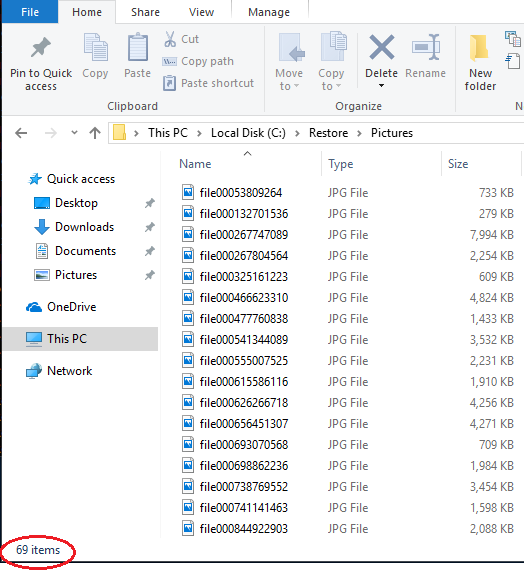
All restored files are listed. The list probably contains errors, because files that need data from corrupted blocks cannot be restored.
In this example, from a corrupted backup with one deleted dblock file and one corrupted dblock file, 69 of 75 picture files were recovered successfully.